MÜDEK – Voice-Assisted Grade Entry Application
Note: This page was translated into English by AI. The original write-up is in Turkish.
Purpose and Scope
This application was developed during my internship period at WINTON SOFTWARE as part of İskenderun Technical University’s Workplace Professional Education (İME) program. The goal was to solve a real pain point: entering student grades manually into MÜDEK-compliant Excel sheets is slow and error-prone. This tool makes the process fast, accurate, and hands-free.
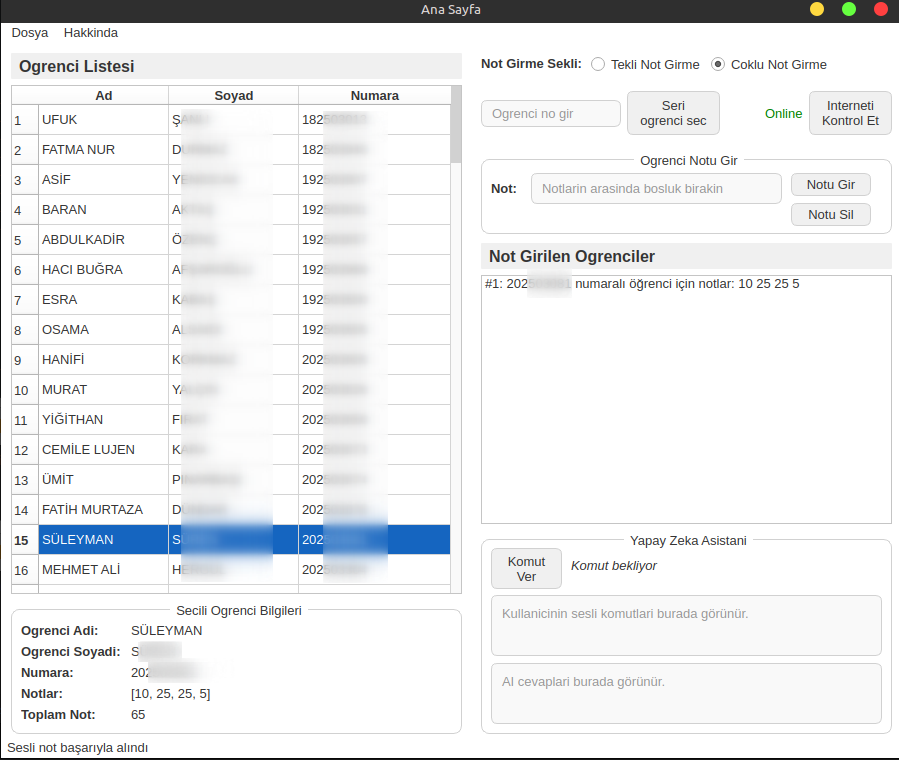
Main application interface
Features
- Voice-based grade entry — speak grades out loud, the app transcribes and fills them in
- Manual (keyboard) entry — as a fallback or for precision
- Multi-student support — enter grades for multiple students in a single session
- Excel-compatible output — writes directly into the MÜDEK-format spreadsheet
- AI model selection — choose which speech recognition model to use
How It Works
On startup, you configure the exam details and table settings. The table settings let you define which Excel columns map to student names and IDs, which row the student list begins on, and which AI model handles transcription. These should only be changed if you know what you’re doing.
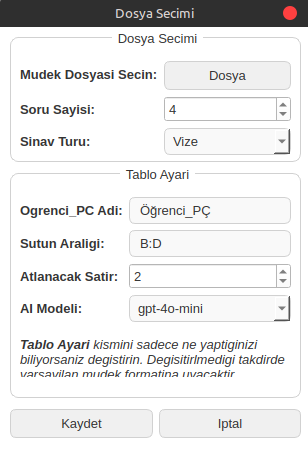
Table settings screen
After configuration, select the entry mode (single student or batch), then press Select Student. Two pop-ups appear in sequence — one to capture the student number by voice, one to capture the grades. Speak in chunks with “ve” between segments for better recognition accuracy (e.g., “212 ve 523 ve 019”). Once all grades are entered, save the file via File > Save.
Installation
pip install -r requirements.txt
python main.py
Projenin Amacı ve Kapsamı
Bu uygulama, İskenderun Teknik Üniversitesi İME (İşyeri Mesleki Eğitim) sürecinde WINTON YAZILIM bünyesinde geliştirilmiştir. Temel motivasyon, MÜDEK uyumlu Excel şablonlarına öğrenci notlarının manuel olarak girilmesinin yavaş ve hata eğilimli olmasıdır. Bu araç süreci hızlı, doğru ve ellere gerek kalmadan gerçekleştirilebilir hale getirir.
Uygulama ana arayüzü
Özellikler
- Sesli not girişi — notları sesli söyleyin, uygulama transkribe edip doldurur
- Manuel (klavye) girişi — yedek seçenek veya hassas giriş için
- Çoklu öğrenci desteği — tek oturumda birden fazla öğrencinin notu girilebilir
- Excel uyumlu çıktı — MÜDEK formatındaki tabloya doğrudan yazar
- AI model seçimi — hangi konuşma tanıma modelinin kullanılacağını seçin
Nasıl Çalışır
Uygulama başlatıldığında sınav bilgilerini ve tablo ayarlarını yapılandırırsınız. Tablo ayarları; öğrenci adı ve numarasının hangi Excel sütunlarına karşılık geldiğini, öğrenci listesinin hangi satırdan başladığını ve transkripsiyon için hangi AI modelinin kullanılacağını tanımlamanıza olanak tanır. Bu ayarlar yalnızca ne yaptığınızı biliyorsanız değiştirilmelidir.
Tablo ayarları ekranı
Yapılandırmanın ardından giriş modunu (tekli veya toplu öğrenci) seçin, ardından Öğrenci Seç butonuna basın. Sırasıyla iki pop-up açılır — biri öğrenci numarasını sesli almak, diğeri notları sesli almak için. Daha iyi tanıma doğruluğu için notları parça parça ve araya “ve” koyarak söyleyin (örn. “212 ve 523 ve 019”). Tüm notlar girildikten sonra Dosya > Dosyayı Kaydet ile kaydı tamamlayın.
Kurulum
pip install -r requirements.txt
python main.py